1
2
3
4
5
6
7
8
9
10
11
12
13
14
15
16
17
18
19
20
21
22
23
24
25
26
27
|
|
|
选择器
基本选择器类型
1.标签选择器
2.id选择器
3.类选择器
样式生效遵循就近原则,距离该元素越近优先级越高
层次选择器
1.后代选择器
在某个元素的后面 ### 2.相邻兄弟选择器 1
2
3
4
| .ClassName+labelName{
background-image: url("https://")
}
|
3.通用选择器
1
2
3
| .ClassName+lableName{
}
|
结构伪类选择器
1
2
3
4
5
6
7
8
9
10
11
| ul li:first-child{
}
ul li:last-child{
}
p:nth-child(n){
}
|
1
2
3
4
5
6
7
8
9
10
11
12
13
14
|
a[条件]{
}
|
CSS作用以及字体样式
传递有效页面信息、美化页面吸引用户、凸显页面主题、优化用户体验 ##
字体样式
1
2
3
4
5
| font-family: 字体;
font-size: 字体大小;
font--weight: 字体粗细;
font-color: 颜色;
|
文本样式
1
2
3
4
5
6
7
8
9
10
11
12
13
14
15
16
17
18
19
| h1{
color: #FF000000;
color: rgba(0,255,255,0.5);
text-align: 文本位置(居中);
text-indent: 2em(段落首行);
background: #FFFFFFFF;
height: 300px;
line-height: 300px;
}
.l1{
text-decoration:overline;
}
img,span{
vertical-align:middle;
}
|
- 颜色:
color
- 文本对齐方式:
text-alian = center
- 行高:
line-height
- 装饰:
text-decoration: none
消除动画
- 文本图片水平对齐:
vertical-align:middle
伪类 & 阴影
1
2
3
4
5
6
7
8
9
10
11
12
13
14
15
16
17
| a{
}
a:hover{
}
a:active{
}
a:visited{
}
#b{
text-shadow: #3cc7f5 10px 10px 10px;
}
|
列表样式
小规范:样式一般先写外面的元素 1
2
3
4
5
6
7
| ul li{
height:30px;
list-style: none;
text-indent: 1em;
}
|
背景
1
2
3
4
5
6
7
8
9
10
11
12
13
14
| div{
width: 1000px;
height: 700px;
border: 1px solid red;
background-image: url("");
background-repeat: repeat-x;
background-repeat: repeat-y;
background-repeat: no-repeat;
background: red url("xxx") 200px 10px no-repeat;
background-position: 280px 10px;
}
|
渐变
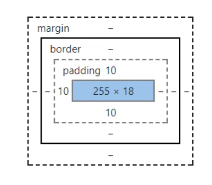
渐变色便捷查询  # 盒子模型
1
2
3
4
5
6
7
8
9
10
11
12
13
| body{
margin:0;
}
#box{
width: 300px;
border: 1px dashed red;
margin: 0 auto;
border: 1px;
padding: 0 0 0 0;
}
|
1
2
3
4
5
6
7
8
| div{
width: 300px;
height: 200px;
border: 10px solid yellow;
border-radius: 10px 0 10px 0;
box-shadow: 10px 10px 100px yellow;
}
|
浮动
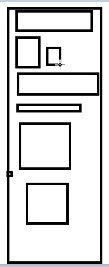
标准文档流
块级元素:独占一行 h1~h6、 p 、 div
行内元素:不独占一行 span a img strong
 标准文档流
标准文档流
display
display: block;display:inlinedisolay:inline-block
float
类似于气泡浮上水面,指定向左或者右浮动
父级边框塌陷
浮动可能会使得内部元素超出父级元素的边缘,因此使用clear让一些元素不漂浮
在父元素后面加一个空的div可以清除这种状况 1
2
3
4
5
6
7
|
div{
    clear:right;
    clear:left;
    clear:both;
    clear:none;
}
|
overfloat